How to Have AI Do Your Bookkeeping, Step by Step
Here is how to have AI do your bookkeeping, start to finish. Give it real books to work in, connect every account, brief it the way you would brief a new bookkeeper, hand it the first batch, and let it reconcile and run the reports. Seven steps, about fifteen minutes the first time, and a five-minute check each week after that.
I ran a bookkeeping firm for eight years and grew it to forty people before I built Switchbooks. I know what a month of books looks like when it is done. I also know where people get stuck when they hand that month to an AI. The question I get most now is how to have AI do bookkeeping, and these are the steps I give. If you want the "can it" question answered first, I wrote Can AI do my bookkeeping? for that.
The short version
- Pick an AI that works in real books: an agent inside bookkeeping software, or your own assistant connected to the books.
- Connect every bank and card account, not just checking.
- Tell the AI about the business in a few sentences.
- Say "post everything in To Review you are sure about and list the rest."
- Answer its questions and let it turn the repeat answers into rules.
- Reconcile each account to its statement, then ask for the P&L and balance sheet.
- Come back once a week and do the same thing in five minutes.
That is the whole method. The rest of this guide is each step in plain words, with what to say and what to watch for.
Step 1: Pick where the AI will work
This is the step that decides whether the rest works. An AI can only do bookkeeping if it has real books to post to, every account in view, and tools to match, reconcile, and report. A chat window with a pasted bank statement has none of those. It can sort rows for you, which is helpful, but it cannot keep books.
You have two good options.
An agent inside the bookkeeping software. In Switchbooks the agent is called Elliott. You talk to it in the app, it sees the page you are on, and it shows you a preview before anything big. If you do not already live in ChatGPT or Claude all day, start here.
Your own assistant, connected to the books. Switchbooks is listed as a plugin in ChatGPT, a connector in Claude, and a plugin in Grok Bot. Connect it, sign in, and the assistant you already use gets the same tools Elliott has. The books live in Switchbooks either way, so you can use both.
Either option works for every step below. The words you say are the same. If you choose the connected route, start with the guide for your assistant: ChatGPT, Claude, or Grok Bot. Each takes about three minutes.
Step 2: Connect every account
Create a free account at switchbooks.ai and connect your bank. Switchbooks uses Plaid, the same connection most banking apps use, so you sign in on your bank's own page and the AI never sees your login. In the app you can do this from the Banking page or just ask Elliott to connect a bank. From ChatGPT or Claude, ask the assistant and it hands you the Plaid link.
Connect everything the business touches: checking, savings, every credit card, and any business loan. This is the mistake I see most. People connect checking only. The AI sees $3,200 leave for the card payment. With no card account on the books, the only honest reading of that row is an expense. Connect the card too and the AI sees both sides, matches them as a transfer, and nothing is double counted.
New connections pull in recent history, and the transactions land in a list called To Review. That list is your first batch.
Step 3: Brief the AI like a new bookkeeper
When a new bookkeeper joined my firm and took over a client, the first thing they got was a ten-minute conversation about the business. Give the AI the same conversation. It takes one message.
Say what the business does, how it gets paid, what the main costs are, and the few things that are not obvious. Something like this:
I run a two-truck landscaping company. Customers pay by card through Square and sometimes by check. My biggest costs are the two crews on Gusto payroll, fuel, Home Depot and SiteOne for materials, and the truck loans. Amazon is office supplies unless it is over $200, then it is equipment. The monthly Zelle to J. Martinez is a subcontractor. I pay myself with a transfer to my personal checking, which is an owner's draw.
That paragraph settles most of the questions the AI would otherwise have to ask. In Switchbooks it is saved with the company, so it holds next month too and whichever assistant you use can read it. You can add to it whenever you learn something you forgot to mention.
Step 4: Hand it the first batch
Now give it the work. Say:
Post everything in To Review you are sure about, and list what you were unsure about with your best guess for each.
What comes back is a table: the rows it posted with the category it chose, the rows it left in To Review, and why. The ordinary 90 percent of transactions post on the first pass, because fuel is fuel and payroll is payroll. The rest are the ones a good bookkeeper would also have asked about: the new vendor, the odd amount, the check with no payee.
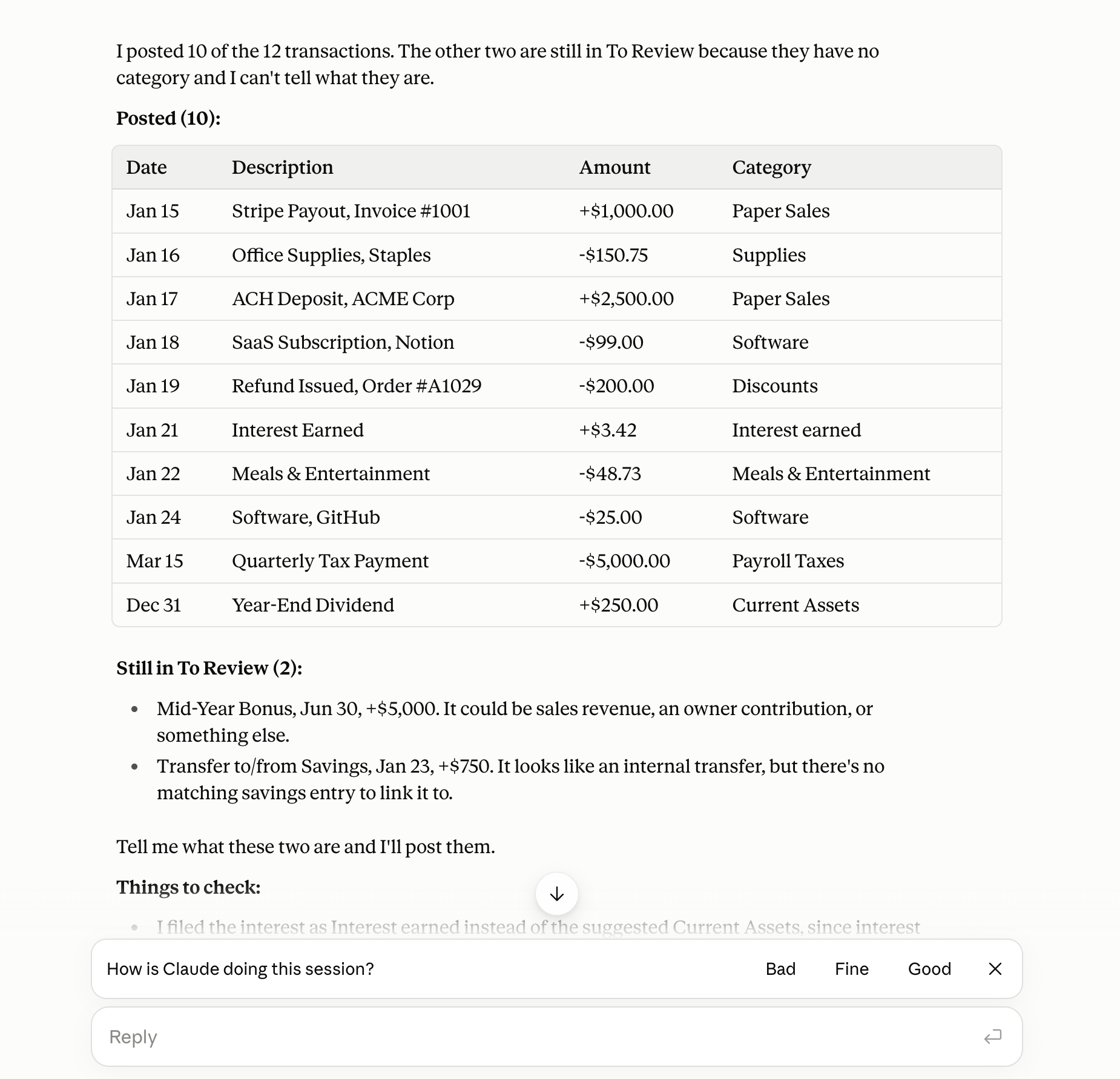
Go through the short list and answer in plain words. "The Square charge is the contractor." "Check 1042 was the insurance deposit." It posts each one as you answer. If a category is missing, tell it to make one. If it got one wrong, say so and it fixes it. Every change is recorded, so if you change your mind later you can ask it to undo a specific one.
If you would rather watch before you trust it, connect read-only first. It will tell you exactly what it would post and why, and you flip to allowing changes when the answers look right.
Step 5: Turn your answers into rules
Most of the questions in the first batch are questions you will only answer once. The AI treats them that way. When you say the Friday Square charge is the contractor, it offers to make a rule, or you can ask for one: "make a rule that Square charges to Joe's are Contractors." From then on every new row that matches files itself. Rules can match on the description, the amount, or the direction, and they can post on their own or hold the row for you to look at.
This is the step people skip, and it is why their second month takes as long as their first. Ten rules after month one usually cover most of what used to need a decision. By month three, the question list is a few lines.
Step 6: Reconcile and run the reports
Reconciling is how you prove the books match the bank. It is the one step that makes everything else trustworthy, and it is the step a pasted statement can never do. When the month's statement arrives, say:
Reconcile checking to the statement ending September 30 with a balance of 12,480.12.
The AI compares the books to that balance and shows a preview. If the numbers match, you say yes and it is done. If it does not, it names the rows that are off, usually a missing fee or a duplicate, and fixes them when you agree. A finished reconciliation can be undone if you ever need to reopen it.
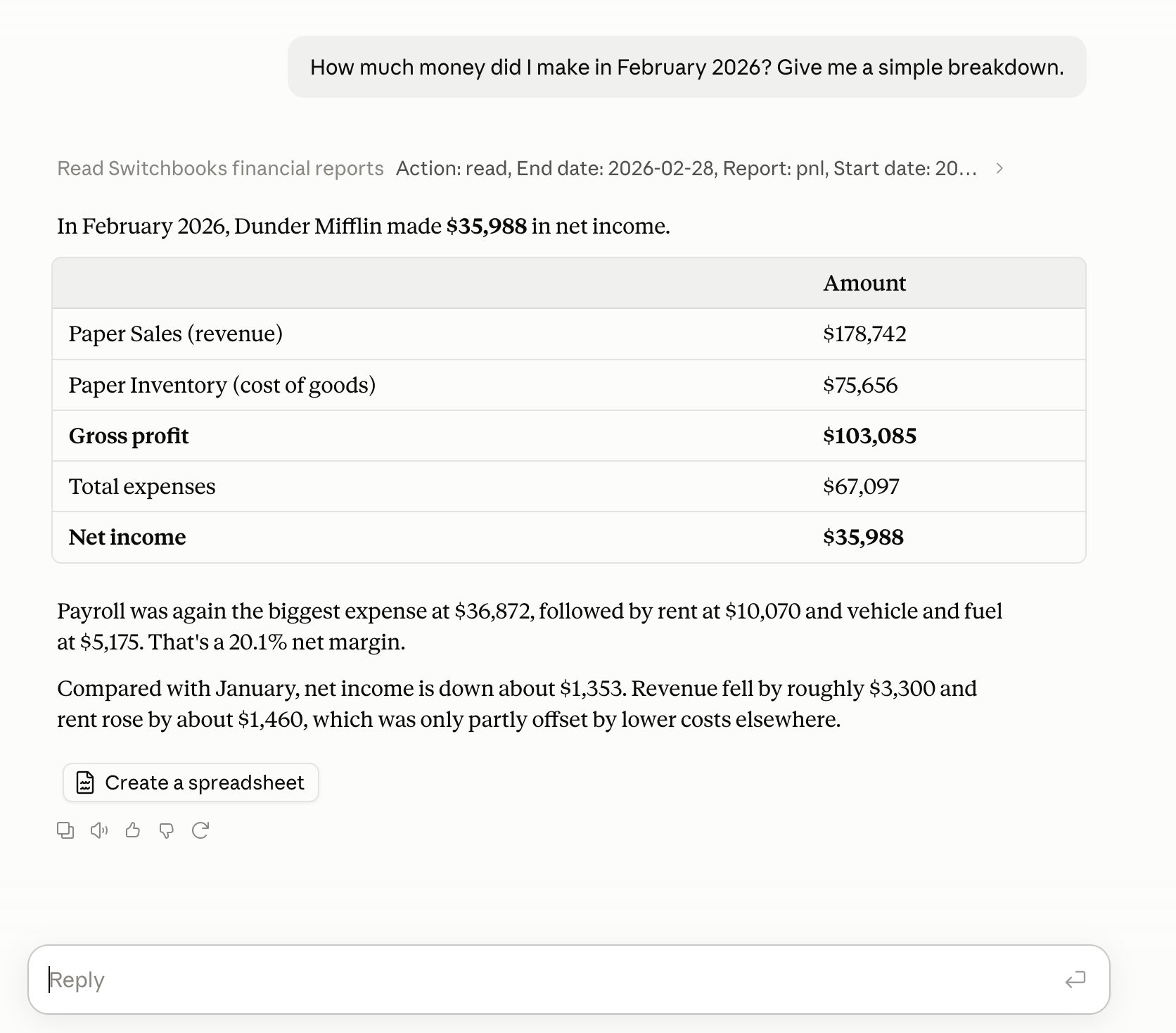
Then ask for the reports. "Show me September's profit and loss." "Balance sheet as of September 30." "Compare this quarter's expenses with last quarter." The books are real and reconciled, so the balance sheet balances and the numbers are the ones you can send to your banker or your accountant. You can also just ask questions about them. That is the part owners end up liking most.
How to check its work
You do not have to read every row to know the books are right. When a senior bookkeeper at my firm reviewed a junior's month, they looked at three things. You can look at the same three in about a minute.
- Each account balance in the books matches the bank. Ask the AI to compare them. If one is off, it shows the rows in between, and that is where a missing fee or a duplicate is hiding.
- To Review is empty. A row still sitting there is not in your reports yet. Ask what is left and why.
- Nothing on the P&L surprises you. Read the category list once. A category you do not recognize, or a cost that doubled, gets one question: "show me the rows behind that."
Three passes and the month is done. If you want a second set of eyes, give your accountant a login and ask them to look at the same three things.
Step 7: Make it a weekly habit
The first month takes about fifteen minutes plus whatever you decide to clean up from before. After that, this is the whole job:
- Once a week: "What is in To Review? Post what you are sure about and ask me about the rest." Answer the two or three questions. Done.
- Once a month: reconcile each account to its statement, then make the three checks above.
- Whenever something changes: tell it. New vendor, new loan, a line of business you dropped. It remembers.
Books kept this way are never more than a week behind. That is a different life from the quarterly scramble most owners know. It also lets the reports mean something, because this September is categorized the same way as last September.
What to keep for yourself
Having AI do the bookkeeping does not mean having AI do everything with the numbers. Keep these for a person.
- Tax treatment and entity questions. Whether that trip is deductible, whether to form a second company, how to handle the distribution. That is advice, and it should come from someone who signs their name to it.
- Year-end. Clean books make year-end fast, but someone still reviews them and files the return.
- The judgment calls. The AI is built to ask when it is not sure. Keep answering. The answers are what make the books yours.
Most owners pair the AI with an accountant for a quarterly look and the return. If you own several locations, run payroll for a real team, and want people handling the whole thing, a firm like Ledge Accounting is still the right answer. Ledge runs its clients on Switchbooks, so the books are the same either way. The difference is who is driving.
What it costs
Switchbooks is $25 per month per company, with every feature included: bank sync, the agent, rules, reports, reconciliation, and the connections to ChatGPT, Claude, Grok Bot, and Cursor. One plan, and a free ten-day trial with no card. At my firm, a small business paid a few hundred dollars a month at the low end for a person to do the same sorting, matching, and reconciling, and well over a thousand when the books were busy.
Read more
- How to have AI do your bookkeeping: the 15-minute setup, the Switchbooks version of this guide, with the exact prompts and a comparison table.
- Which AI agents, plugins, and connectors actually do the books, with a six-question test.
- Can ChatGPT do my bookkeeping?
- Can Claude do my bookkeeping?
- Every way to connect an assistant to Switchbooks
- Can AI do my bookkeeping? on this site.
Common questions
How do I have AI do my bookkeeping?
Give the AI real books to work in, not a pasted statement. Connect every bank and card account, tell the AI about the business the way you would brief a new bookkeeper, then ask it to post what is in To Review and list what it is unsure about. Answer its questions, turn the repeat answers into rules, reconcile each account to its statement, and ask for the reports. After the first month it is a weekly five-minute check.
Can I have ChatGPT do my bookkeeping?
Yes, once ChatGPT is connected to real books. Install the Switchbooks plugin from the ChatGPT plugin directory, sign in, tick Allow bookkeeping changes, and type @switchbooks in a chat. The same connection exists for Claude, Grok Bot, Cursor, and any MCP client. With only a pasted statement, ChatGPT can sort rows but cannot post, match transfers, or reconcile.
Do I need accounting software for AI to do my bookkeeping?
Yes. Bookkeeping is posting to real books, matching transfers, proving the books match the bank, and producing reports that add up. A chat has none of that. The software holds the books; the AI does the work in them. Switchbooks is built this way, with an agent inside the app and connections for ChatGPT, Claude, Grok Bot and Cursor.
How long does it take to set up?
About fifteen minutes: a few minutes to connect the accounts on Plaid, ten minutes to brief the AI and answer its first questions. The first batch of transactions posts in the same sitting. Reconciling the first month takes a few more minutes once statements arrive.
How do I know the AI got my books right?
Make three checks. Each account balance in the books matches the bank. Nothing is left in To Review. And nothing on the profit and loss surprises you. If one check fails, ask the AI what is off and it shows the rows.
Is it safe to let AI change my books?
You choose read-only or allow changes when you connect, and you can start read-only. Every change the AI makes is recorded and most can be undone from the same chat. No connected AI can sign in to your bank, move money, invite or remove people, share a report, or change billing. The details are on the Switchbooks security page.
What does it cost to have AI do my bookkeeping?
Switchbooks is $25 per month per company with every feature and every assistant connection included, and a free ten-day trial with no card. A human bookkeeper typically costs a few hundred to over a thousand dollars a month. Most owners pair the AI with an accountant for a quarterly look and the tax return.
More guides on this site
- Can AI do my bookkeeping? An honest answer from a bookkeeper
- ChatGPT bookkeeping plugin: how to use ChatGPT for bookkeeping
- Claude bookkeeping connector: how to use Claude for bookkeeping
- Grok Bot bookkeeping plugin: how to give your Bot the books
- Best ChatGPT plugins for small business
- Best Claude connectors for small business
- Best Grok Bot plugins for small business
- What is Switchbooks?
- What is Ledge Accounting?