Claude Bookkeeping Connector: How to Use Claude for Bookkeeping, Step by Step
Yes, there is a bookkeeping connector for Claude. Switchbooks is listed in the Claude connector directory, and once it is connected, Claude is no longer guessing from a pasted statement. It is working in your actual books: every account, every category, every rule, and the history behind them. It can post transactions, match transfers, book journal entries, reconcile accounts, and run your profit and loss, with your permission and with undo.
I ran a bookkeeping firm for eight years before building Switchbooks, and this is the setup I wish I had for every client. Here is how to connect Claude to your books in about three minutes, what to say once it is connected, and where the limits are.
Why Claude needs a connector to do bookkeeping
Claude on its own is a very good explainer and a decent categorizer. Paste in a statement and it will sort most rows sensibly. But it is working on a copy of one account, in a chat that forgets. It cannot see the credit card, so the payment from checking looks like an expense. It cannot reconcile, because it has nothing to reconcile against. And next month it starts over.
A connector gives Claude two things it is missing: tools and a database. The tools are the actions a bookkeeper takes: post, match, book, reconcile, report. The database is the ledger that holds the result, so a decision made in March still applies in April. That is the whole difference between helping with the books and doing them. I wrote more about that line in Can AI do my bookkeeping?
Connect Claude to your books in three steps
You can sign in with an existing Switchbooks account or create one during the connection. If you are new, sign up first (ten days free, no card) and connect your bank in the app, or ask Claude to connect it after step three and it hands you a link to Plaid's own sign-in page.
- Open the listing and click Connect. Go to Switchbooks in the Claude directory and click Connect. On a Team or Enterprise plan, your organization owner may need to add the connector first.
- Sign in and choose what Claude may do. Claude sends you to Switchbooks. You will see a box labeled Allow bookkeeping changes. Keep it checked if Claude may post, match, and reconcile. Uncheck it for a read-only connection that can answer questions and run reports but change nothing. Click Allow. Claude never sees your Switchbooks password. The connection uses OAuth, like "Sign in with Google."
- Turn it on in a chat. Open +, then Connectors, and enable Switchbooks. Say "List my Switchbooks companies," then "Use [company name]." Every answer from then on is tagged with the company it came from.
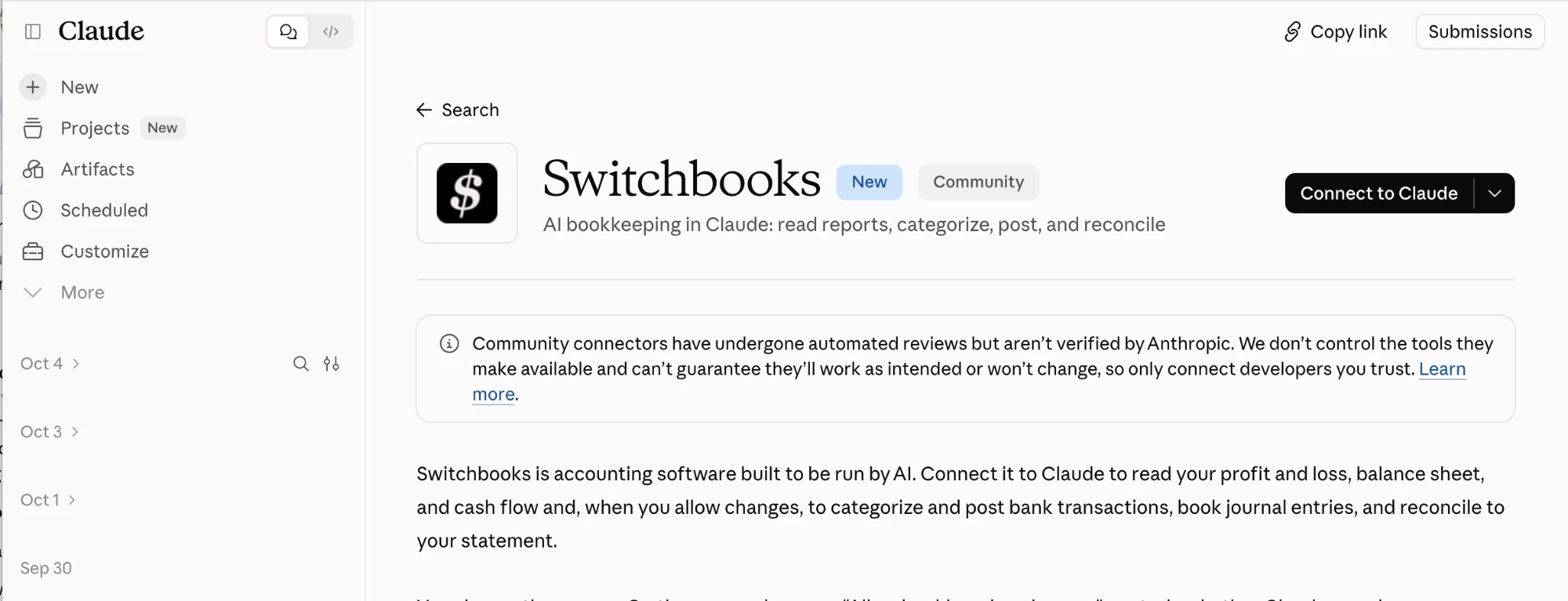
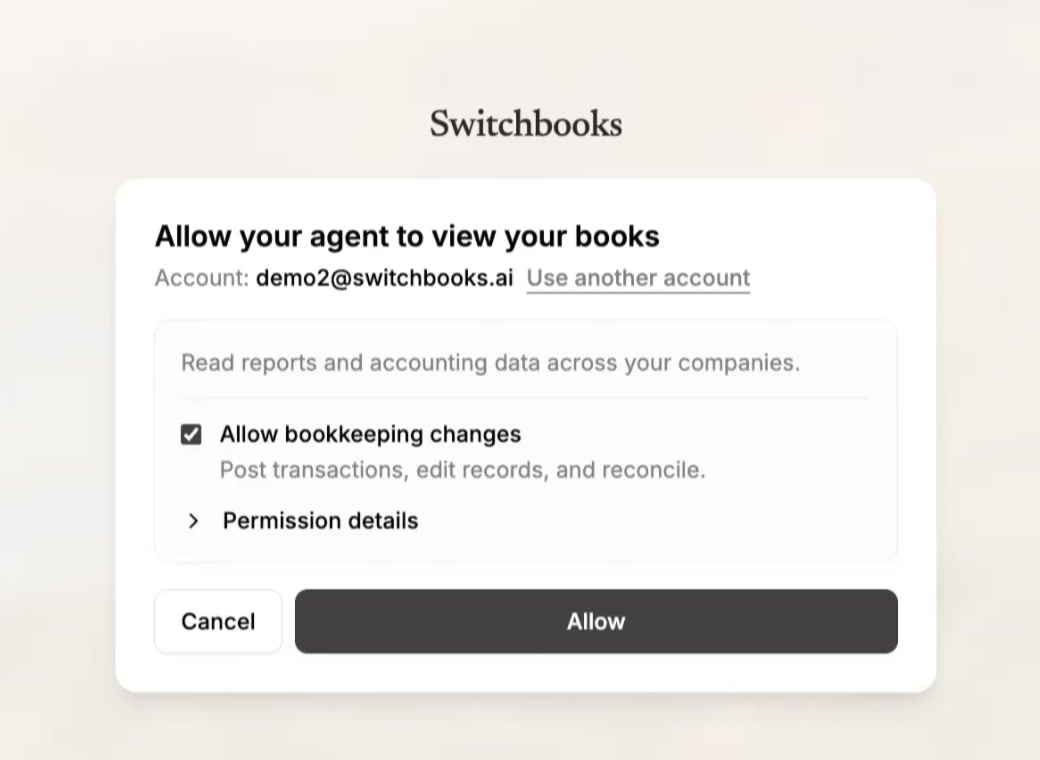
Prefer to add it by hand? Open Customize, then Connectors, click +, choose Add custom connector, name it Switchbooks, and enter the server URL https://app.switchbooks.ai/api/mcp. Same result. There is a three-and-a-half-minute video of the whole setup in Can Claude do my bookkeeping? on the Switchbooks blog.
What to say to Claude, in order
- Brief it. "We are a two-truck plumbing company. Ferguson is materials, the Shell charges are fuel, and the Zelle payments to Ortiz are contractor labor." Claude keeps that in the books, not in the chat, so it is still there next month.
- Start with questions. "Show me last month's profit and loss." "What is sitting in To Review?" "What is my checking balance, and when was it last reconciled?" These are safe on any connection and show you how much Claude can now see.
- Let it post. "Categorize and post everything in To Review you are sure about, and list what you are not sure about." Answer its questions.
- Match the transfers. "Match the transfers between checking and the credit card." Now the card payment counts once.
- Make rules. "Amazon charges are office supplies unless they are over $200, then equipment. Make that a rule." Rules run on every new row from then on.
- Reconcile. "Reconcile checking through September 30 against this statement." Attach the statement. Claude shows a preview of what ties and what does not, and finishes when you say yes.
- Book an entry. "Book a journal entry to accrue $4,000 of September rent."
- Check its work. "What did you change today?" and, if something is wrong, "Undo that last change."
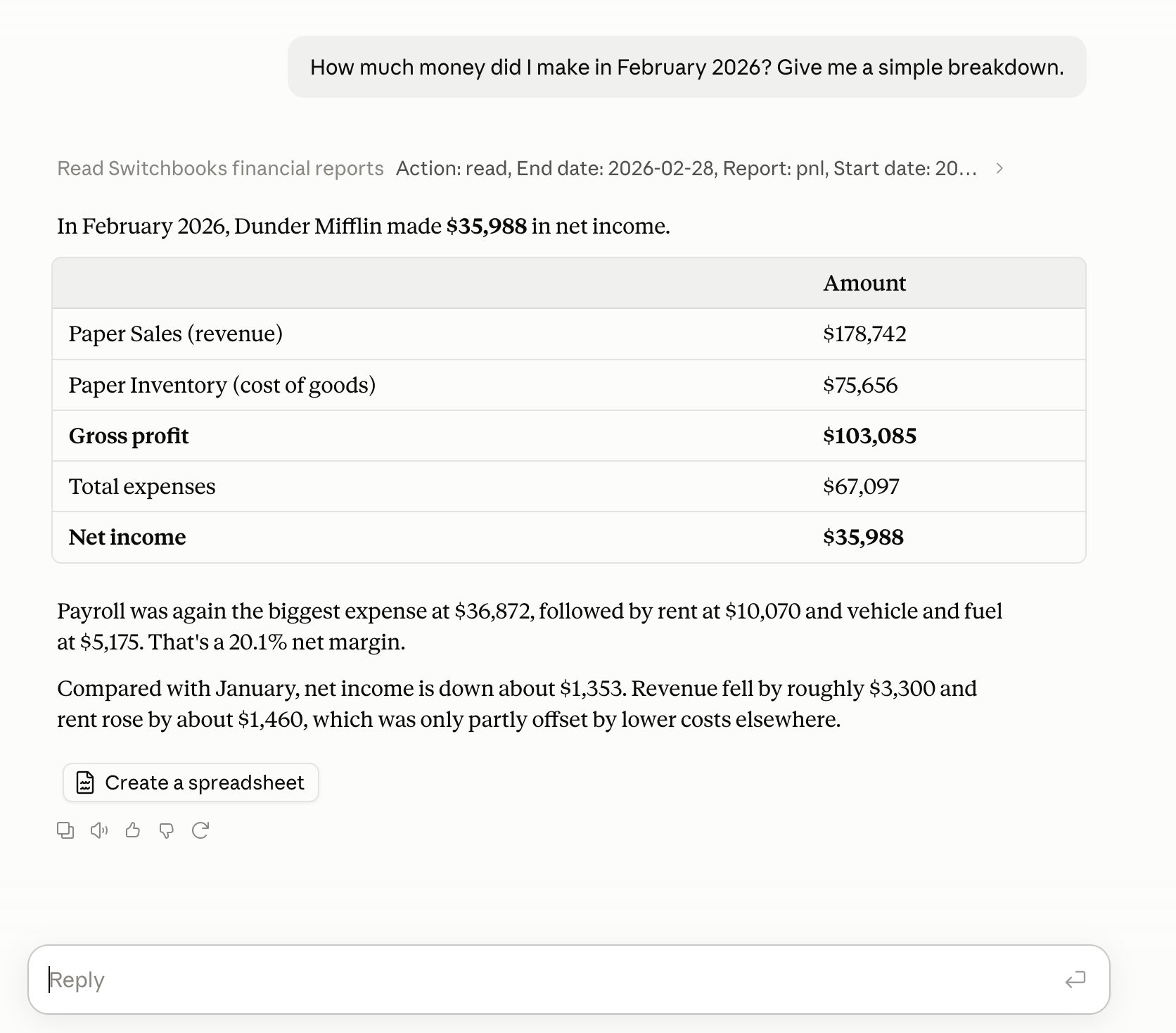
That is a real answer on a demo company. Claude runs the actual report from the actual ledger, so it is the same P&L you would see in Switchbooks, with every account included.
What Claude can change, and what it cannot
Read-only: search transactions, run a profit and loss, balance sheet, cash flow, forecast, or trial balance for any dates, open the entries behind any number, list categories, payees, rules, accounts, and the team, and read stored receipts and statements.
With changes allowed: post and split rows in To Review, match transfers, book and edit journal entries, create, rename, and merge categories and payees, make rules, reconcile from a preview, book an opening balance, attach files, make a new company, and connect a bank through Plaid's own sign-in page. It will also sync a bank, merge accounts, or email your team, but only after asking you.
Never: sign in to your bank for you, move money, invite or remove people, share a report, change billing, or delete the company. Those happen in the Switchbooks app. The full list is on the AI assistants page.
Permission and undo
You choose read-only or allow changes when you connect, and you can disconnect at any time from Customize, then Connectors. Underneath that, Switchbooks records every change Claude makes. Ask what changed and you get the list in plain words. Ask it to undo one and it reverses that change the same way a person would. Steps that are hard to reverse, like merging two categories, wait for your yes. How the data is protected is on the Switchbooks security page.
Several companies, one chat
If you are a bookkeeper or run more than one business, the connector sees every company your Switchbooks login can see. Say "Use [company name]" to switch, and every answer is tagged with the company it came from, so two clients cannot get mixed up. The same login works in ChatGPT, Grok Bot, and Cursor, so a team can use whichever assistant each person prefers and the books are the same.
What it costs
Nothing extra for the connector. Switchbooks is $25 per month per company, every feature included, with a free ten-day trial and no card to start.
Read more
- Can Claude do my bookkeeping? on the Switchbooks blog, with the setup video and screenshots of each step.
- 10 best Claude connectors for small business
- Best Claude connectors for small business, my shorter list on this site.
- The connect tutorial, with every assistant on one page.
- Every way to connect an assistant to Switchbooks
Common questions
Is there a bookkeeping connector for Claude?
Yes. Switchbooks is listed in the Claude connector directory at claude.ai/directory/switchbooks. Click Connect, sign in to Switchbooks, choose whether Claude may make changes, and turn it on in a chat. Claude can then read your books, run reports, post transactions, match transfers, book journal entries, and reconcile.
How do I connect Claude to my accounting software?
Open Switchbooks in the Claude directory and click Connect. Sign in to Switchbooks or create an account, keep Allow bookkeeping changes checked if Claude may post and reconcile, and click Allow. In a chat, open the + menu, then Connectors, turn on Switchbooks, and say List my Switchbooks companies.
Can Claude post transactions and reconcile my accounts?
With Allow bookkeeping changes checked when you connect, yes. Claude can post and split rows in To Review, match transfers, book and edit journal entries, make rules, and reconcile an account to its statement from a preview. Every change is recorded in Switchbooks and most can be undone from the chat.
Is it safe to connect Claude to my books?
The connection uses OAuth, so Claude never sees your Switchbooks password or your bank login. You choose read-only or allow changes when you connect, you can disconnect from Customize, then Connectors, at any time, and every change is recorded in Switchbooks with undo for most of them.
Does this work with Claude Team or Enterprise?
Yes. On Team and Enterprise plans an organization owner may need to add the Switchbooks connector first, then each person connects their own Switchbooks account.
What is MCP, and do I need to know about it?
MCP, the Model Context Protocol, is the open standard that lets an assistant like Claude use an outside tool such as Switchbooks. You do not need to know anything about it to use the directory listing. If you prefer to add the connector by hand, the server URL is https://app.switchbooks.ai/api/mcp.
More guides on this site
- Can AI do my bookkeeping?
- ChatGPT bookkeeping plugin: how to use ChatGPT for bookkeeping
- Grok Bot bookkeeping plugin: how to give your Bot the books
- Best ChatGPT plugins for small business
- Best Claude connectors for small business
- Best Grok Bot plugins for small business
- What is Switchbooks?
- What is Ledge Accounting?